

Now, I’m just going to come out and say it – this is NOT the only fix for free/busy issues when configuring Exchange Online Hybrid with an on-prem Exchange server. If you’re reading this, then it’s more than likely that you (like me), have been reading countless TechNet articles, blog posts, forum posts, etc. Well, at the end of it all, this was the fix for my free/busy issues, and I thought others might benefit by finding this ahead of time, and hopefully cut out some of the Googling Binging… 😉
The Problem:
Pretty straightforward – users on prem could not see the free/busy status of users in Office 365. I worked my way through every setting I could think of, including (but not limited to) Autodiscover, DNS, permissions, certificate settings, Exchange CU level, to no avail!
Also, if you haven’t seen this before, the hybrid environment free/busy troubleshooter was actually a great help in systematically working your way through potential problem spots.
The Solution:
Eventually, I came across this TechNet blog post which gave me the answer I needed – now, I will say that I’ve never had to set this before, and never noticed this setting missing on previous hybrid configs, but anyway…
In my on-prem environment, the TargetSharingEpr setting was blank, like so:
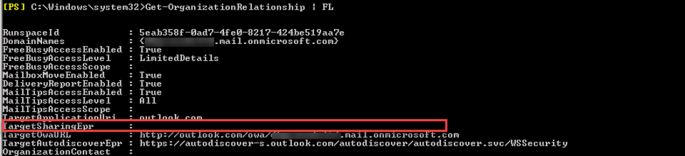
Thankfully, the fix for this is simple – run the following from an elevated PowerShell prompt:
Get-OrganizationRelationship | Set-OrganizationRelationship -TargetSharingEpr “https://outlook.office365.com/ews/Exchange.asmx”
This is what it should look like when you’re done:
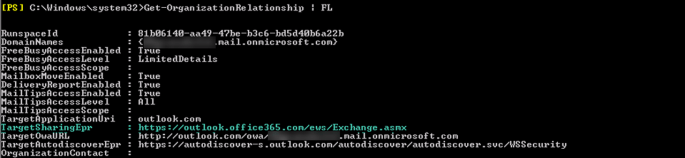
I also checked my Exchange Online org settings and found that the TargetSharingEpr was also blank:
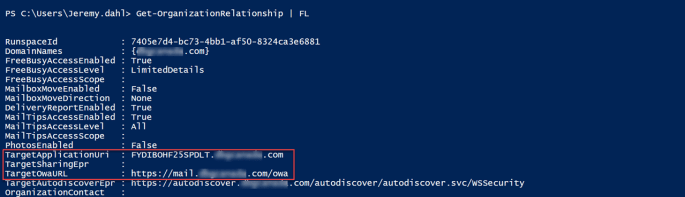
Now, I wasn’t having any issues with free/busy in this direction, but I thought I’d go ahead and update it anyway – just in case. Make sure that this time around, you’re connecting to Exchange Online, and not your on-prem Exchange, and point it back to your EWS endpoint:
Get-OrganizationRelationship | Set-OrganizationRelationship -TargetSharingEpr “https://hybrid.mydomain.com/ews/exchange.asmx“
(I don’t have to tell you that hybrid.mydomain.com needs to be updated to your own hybrid namespace, do I?) 😛
When you’re done, it should look like this:
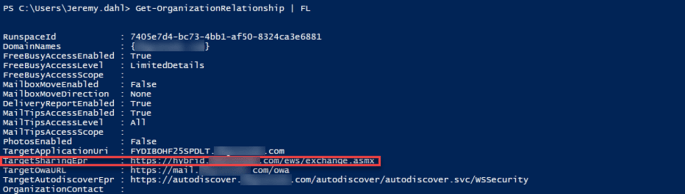
There you have it – hope this helps someone else solve some free/busy issues without having to spend hours of frustrating trying everything else!


If you are ever in Ohio I owe you a beer! I have been working on this issue for a month. I went over their troubleshooter countless times worked with MS for weeks to no avail. But a BING search (great minds think alike) and I found your post.
LikeLike
Glad it helped you, Craig! I look forward to that beer next time I’m in Ohio 😉
LikeLike
Thank you, but was there anything else you had to do afterwards?
LikeLike
Hey Carlos,
I’ve had to do many different things to fix free/busy issues over the years, this was just one that stood out as a fix I hadn’t run into before. The free/busy troubleshooter is often a great place to start, and running through it can fix most issues without having to open a ticket with Microsoft support.
LikeLike
Wow – if this works – I could kiss you!
I wondered why the “TargetSharingEpr” was blank each time I ran “Get-OrganizationRelationship”, so after a couple weeks of repetitive troubleshooting, I decided to google that and your article FINALLY showed up. 😛
Did you have to run IISReset as well after making these changes?
Also, what about updating the same “TargetSharingEpr” field (which is also blank) under the “IntraOrganizationConnector” to say the same thing?
Note – didn’t have to run IISReset at all, the changes made were instant and it started working properly.
LikeLike
Glad it worked for you 😀 – no, I definitely didn’t need to an IIS Reset either, it just started working right away. I’ve never updated the IntraOrganizationConnector (never had a scenario that needed it updated). If you have a sharing scenario that’s still not working, I guess it’d be worth a try? I don’t think you need to add it there as well just for the Office 365 free/busy to work.
LikeLike
Awesome this resolved the issue for me too! Thanks for writing this up.
LikeLike
this solved my problem, thanks a lot!
LikeLike
Hi Jeremy,
I have applied it and it didn’t work.
I just saw my on-prem and EXO’s TargetApplicationUri is empty
LikeLike
Hey Sada,
I haven’t had to do this in a while, but the last I checked it was still valid – what version of Exchange are you working with?
LikeLike
Hi Jeremy,
Thanks for your reply.
We have Exchange 2016 Server.
Regards
Sada
LikeLike
Nice blog thanks for postiing
LikeLike
Thank you! We needed to configure the various URI and EPR options because we were using a specific Exchange server for our hybrid rather than relying on the older servers. This article got it working.
LikeLiked by 1 person
Two questions – Are the images above in what you did reversed?
If so, I have hybrid environment with some weird happenings. I have all my mailboxes in the cloud and my on-prem is just there. I need to share f/b with two outside 365 domains. Domain 1 I could not see at all and he could not see me. Domain 2 worked both ways. I made the changes to the TargetAutoDiscoverEpr to be the one for 365 and my targetapplicationuri I made office. com SharingEpr is blank. After doing that, Domain 1 straightened out and Domain 2 can see me but I can’t see him. What am I doing wrong.
LikeLike
Hey Joseph,
If you’ve moved all your mailboxes to the cloud, and your on-prem server is just there for management purposes, I don’t think it should be impacting what you’re trying to do here. If you’re sharing F/B with outside domains that would be configured in your org sharing settings in M365, and not here in the Exchange server on prem. Unless I’m missing something in your configuration, I’m pretty sure that you should be able to remove this server from the equation entirely. The only way I could see it being part of the picture still is if you have your autodiscover pointing on prem still, and if you do, then you should change that so autodiscover is pointing to Exchange Online instead.
Hope this helps,
Jeremy
LikeLike